Honeywell T10 Pro Smart Thermostat Review: Features & Reliability
Want a smart thermostat that truly understands your home? The Honeywell T10 Pro might be your answer.
This thermostat does more than control temperature. It learns your home’s unique heating and cooling needs. With multi-room sensors, it fixes hot and cold spots in different rooms.
The 5-inch touchscreen display is simple to use. You can also control it through the mobile app or your voice. It works smoothly with Alexa, Siri, and Google Assistant.
Honeywell built this device for comfort and smart control. It supports complex HVAC systems, including heat pumps and conventional setups. You get precise modes like Dehumidify and Emergency Heat.
In this review, we break down the features, performance, and real user experiences. Let’s see if the T10 Pro earns a spot in your home.
In a Nutshell
The Honeywell T10 Pro stands out as a smart choice for whole home temperature control. Here is what you need to know before you decide.
-
Smart Sensor Technology: The included RedLINK room sensor tracks temperature in specific rooms. You can add up to 20 sensors for complete home coverage.
-
Flexible System Support: This thermostat works with heat pumps and conventional systems. It handles multiple heating and cooling stages with ease.
-
Voice Control Ready: Alexa, Siri, and Google Assistant all work smoothly with this device. You can adjust settings just by speaking.
-
Remote Access: The mobile app lets you control your home temperature from anywhere. Change settings during work or while traveling.
-
Mixed Reliability Reports: Some users report durability concerns over time. Warranty issues have popped up in certain cases.
-
Strong Performance Record: Many owners praise its stability during daily use. The system holds temperature settings accurately across different seasons.
This thermostat suits homeowners who want detailed room by room control. It also fits those who already use smart home voice assistants daily.
Key Features and Display
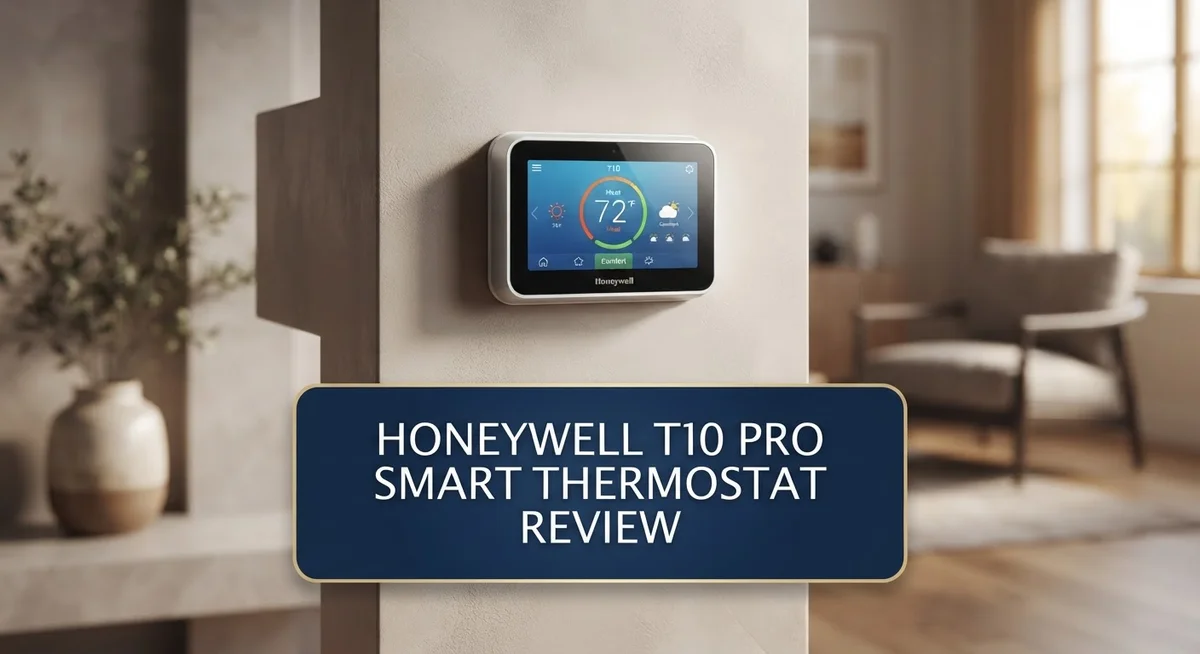
The display is where you interact with your thermostat every day. The T10 Pro features a 5-inch touchscreen that responds quickly to your touch. You can swipe through menus and adjust settings without any lag.
One standout feature is the customizable display faces. You get to choose how your thermostat looks on the wall. Pick from different color schemes and information layouts. This means your thermostat matches your home’s style, not the other way around.
The screen shows all the information you need at a glance. You see current temperature, humidity levels, and your schedule. The interface uses large text and clear icons. Even from across the room, you can read what’s happening with your heating and cooling.
The T10 Pro handles complex heating and cooling setups. It supports up to 3 heat and 2 cool stages for heat pump systems. For conventional systems, you get 2 heat and 2 cool stages. This flexibility means the thermostat works whether you have a simple setup or a more advanced system.
Operating modes give you full control over comfort. You can switch between Heat, Cool, Emergency Heat, Dehumidify, and Humidify. Each mode serves a specific purpose. Heat keeps you warm in winter. Cool manages summer temperatures. Emergency Heat kicks in if your primary heating fails. Dehumidify removes excess moisture from the air. Humidify adds moisture when the air gets too dry.
The RedLINK room sensor included with your purchase makes a real difference. This sensor sits in another room and reports temperature back to the thermostat. You can add up to 20 remote sensors throughout your home. This means your thermostat doesn’t just measure temperature at the wall. It learns what’s happening in your bedroom, living room, and kitchen. The system then adjusts heating and cooling to balance temperatures across your entire home.
Time-based scheduling on the included sensor lets you set different comfort levels for different times. Your thermostat becomes smarter about when to heat or cool. The display makes managing these schedules simple and straightforward.

- Honeywell THX321WFS3001W T10+ Pro Smart W/RedLINK 3.0 Thermostat and Indoor Air Sensor
Last update on 2026-11-01 / Affiliate links / Images from Amazon Product Advertising API
Smart Home Integration and Voice Control
The Honeywell T10 Pro connects seamlessly to your smart home ecosystem. Alexa, Siri, and Google Assistant all integrate without hassle. You can speak commands to adjust temperature, check status, or change modes instantly.
Voice control works reliably across all three platforms. Your family members can use their preferred assistant. The thermostat responds quickly to voice requests. No complicated setup or confusing pairing processes required.
The mobile app gives you complete remote access. Check your home temperature from work, vacation, or anywhere else. Adjust settings in seconds using your smartphone. The app interface is clean and straightforward to navigate.
Multi-room sensor support sets this thermostat apart from basic models. The included RedLINK room sensor measures temperature in specific rooms. You can add up to 20 additional remote sensors throughout your home. This means your upstairs bedroom stays cool while your downstairs stays warm, exactly as you want it.
Time-based scheduling works with your room sensors. Different comfort levels activate at different times automatically. Your morning bedroom temperature can differ from your afternoon setting. The system learns your patterns and adjusts accordingly.
Smart home routines become more powerful with this thermostat. Create scenes that trigger temperature changes when you leave home. Set up automations that activate heating before you wake up. Combine temperature control with lighting and security features.
The touchscreen display shows information clearly. You can see current temperature, humidity, and active mode instantly. The customizable faces let you choose what matters most to you. Some users prefer a simple display while others want detailed data.
Integration stability remains strong for most owners. The WiFi connection stays consistent throughout the day. Voice commands execute without delays. Mobile app updates keep compatibility current with your smart home devices.
Real users report smooth experiences with major voice assistants. Setup takes about fifteen minutes for most people. The thermostat communicates reliably with your home network. Smart home enthusiasts appreciate the flexible integration options available.
Multi-Room Sensor Capabilities
The multi-room sensor capabilities make the Honeywell T10 Pro a standout choice for homes where temperature varies room to room. Your thermostat comes with one RedLINK room sensor already included. This sensor lets you monitor temperature in a specific room beyond your thermostat’s location.
You can add up to 20 remote sensors throughout your home. This means you track temperature in bedrooms, living areas, home offices, and any other space that matters to you. Each sensor communicates wirelessly with your main thermostat unit for consistent updates.
The real power comes from time-based scheduling on each sensor. You set different comfort levels for different times of day in each room. Your bedroom might stay cooler at night while your living room warms up in the morning. The system adjusts automatically based on your schedule, not just one central location.
This approach solves a common problem in many homes. Upstairs rooms often feel different from downstairs spaces. Corner rooms get more sunlight than interior areas. Without multi-room sensors, your thermostat only knows the temperature at its own location. The T10 Pro sees the full picture across your entire home.
Smart scheduling works seamlessly with your sensor network. You create routines for weekdays versus weekends. Morning routines differ from evening settings. The thermostat learns your preferences and adjusts room by room.
Voice commands work with your sensor setup too. Tell Alexa or Google to adjust specific rooms without touching your phone. The mobile app shows you temperature readings from every sensor in real time. You spot problem areas instantly and make adjustments from anywhere.
Installation remains straightforward for most homeowners. Wireless sensors mount easily on walls or shelves. Battery life typically lasts over a year per sensor. The system pairs new sensors quickly through your thermostat’s touchscreen.
This granular control transforms how your heating and cooling operates. Rather than one temperature for your entire home, you get personalized comfort in each space. The multi-room approach means less wasted energy and better overall comfort throughout your house.
Top 3 Alternatives
Ecobee SmartThermostat

- Save up to 23% every year on heating and cooling costs, adjusts to your set schedule to save energy when...
- Compatible with 85% of systems, check your system’s compatibility with our online ecobee Compatibility...
- Change your temperature by easily tapping the color touchscreen or using the ecobee app. Plus, free...
Last update on 2026-11-01 / Affiliate links / Images from Amazon Product Advertising API
The Ecobee SmartThermostat brings smart comfort to your home with voice control built right in. You get a microphone and speaker that let you adjust temperature hands-free. The device learns your schedule and adjusts heating or cooling automatically.
This thermostat works with most HVAC systems. You can monitor energy usage through the app and set schedules for different times. Remote access means you control temperature from anywhere. The installation process is straightforward for most homeowners.
Nest Learning Thermostat

- Nest’s smartest, most advanced thermostat yet, the Google Nest Learning Thermostat (4th gen) is a...
- Savings you can count on: The Nest Learning Thermostat can help save up to 31% on heating and cooling...
- Improved compatibility: It works with most 24V systems, including gas, electric, oil, forced air, heat...

Last update on 2026-11-01 / Affiliate links / Images from Amazon Product Advertising API
Nest stands out because it learns your habits over time. The thermostat adjusts itself based on when you’re home and away. You don’t need to program schedules manually.
The Nest app shows you detailed energy reports. You can see exactly how much heating or cooling you use each day. The device has a sleek design that fits modern home aesthetics. Automatic energy-saving features kick in when you leave the house. Voice control works with Google Assistant for seamless integration.
Emerson Sensi Smart Thermostat

- PRIVACY PROTECTION*: Sensi won’t sell your personal information to third parties
- EASY DIY INSTALLATION: Use the built-in level and step-by-step app instructions for a quick installation...
- SAVE ABOUT 23% ON HVAC ENERGY*: The ENERGY STAR-certified Sensi smart thermostat can help you save energy...
Last update on 2026-11-01 / Affiliate links / Images from Amazon Product Advertising API
Emerson Sensi offers simple, reliable smart home control without unnecessary complexity. The app interface is clean and easy to navigate. You set schedules, adjust temperature remotely, and track energy usage.
Sensi works with most standard HVAC systems. Geofencing technology detects when you leave or arrive home. The thermostat adjusts automatically based on your location. Installation takes about 30 minutes for most people. Customer support is responsive and helpful when you have questions.
Each option provides different strengths for smart home automation and energy management.
Installation and Compatibility
The Honeywell T10 Pro works with most standard HVAC systems in homes. It supports up to 3 heat and 2 cool heat pump configurations, plus 2 heat and 2 cool conventional systems. This flexibility means you can install it whether you have a simple single-stage setup or a complex multi-stage system.
Installation is straightforward for most homeowners. The wiring connects to your existing thermostat terminals without special modifications. You’ll need a C wire (common wire) for full functionality, though some installers can work around this limitation. The 5 inch touchscreen mounts easily on your wall using standard brackets.
The RedLINK room sensor comes included with your purchase. This sensor connects wirelessly to your thermostat, so you don’t need to run additional wiring through walls. Setup happens through the mobile app, which guides you step by step. The process takes just a few minutes for most people.
WiFi compatibility matters for smart home integration. Your home network needs a 2.4GHz or 5GHz connection. The T10 Pro connects to Alexa, Siri, and Google Assistant without extra hubs or bridges. This means you get voice control immediately after installation.
The multi room sensor support opens up new possibilities. You can add up to 20 remote sensors throughout your home. Each sensor works independently, letting you monitor temperature in bedrooms, living rooms, and other spaces. The system learns from these sensors and adjusts heating and cooling accordingly.
Compatibility extends beyond just HVAC systems. The T10 Pro integrates with your existing smart home setup. Whether you use Amazon, Apple, or Google devices, this thermostat fits in seamlessly. The mobile app works on both iOS and Android phones.
One thing to note: professional installation is available if you prefer not to handle it yourself. Many HVAC companies offer installation services for smart thermostats. This option removes any guesswork about wiring or configuration.
Mobile App and Remote Management
The mobile app transforms how you manage your home’s temperature from anywhere. You can adjust settings, check current conditions, and monitor energy usage without being near the thermostat. The app works on both iOS and Android devices, so you stay connected regardless of your phone choice.
Remote management puts control in your pocket. Change the temperature while you’re at work, on vacation, or running errands. The app shows real time data from all your room sensors, giving you a complete picture of your home’s climate. You see exactly which rooms are warmer or cooler than others.
Notifications keep you informed about temperature changes and system status. Your thermostat can alert you if something unusual happens. You receive updates about filter changes, maintenance needs, and system performance. These alerts help you catch problems early before they become expensive repairs.
The app interface stays simple and intuitive. You don’t need to dig through confusing menus or technical jargon. Most users find the controls straightforward and easy to understand. Scheduling features let you create different temperature plans for weekdays, weekends, and special occasions.
Multi-sensor management happens right from your phone. You can see data from each room sensor individually. Adjust settings for specific sensors or create zones based on your needs. This level of detail makes a real difference in homes where rooms have different temperature preferences.
Connectivity requires a stable WiFi connection at your thermostat location. Your home network needs either 2.4GHz or 5GHz bands. Once connected, the app maintains reliable communication with your device. Most users report consistent performance without frequent disconnections.
The remote management system integrates smoothly with your smart home routines. You can combine thermostat adjustments with other automations. Set your home to cool down when you leave work, or warm up before you arrive home. These automated sequences save time and improve comfort without manual adjustments.
Backup controls remain available if your internet connection drops. Your thermostat continues operating normally with its built in programming. The app simply becomes unavailable temporarily. Your home stays comfortable even when cloud services experience issues.
Pros and Cons
Pros
- Multi-room sensor network lets you control temperature in different zones independently throughout your home
- Included RedLINK room sensor arrives ready to use with time based scheduling built in
- Works reliably with Alexa, Siri, and Google Assistant for hands free voice commands
- Large 5 inch touchscreen displays custom faces and responds quickly to your inputs
- Supports up to 20 remote sensors so you can monitor and adjust nearly every room
Cons
- Some users report reliability issues and warranty failures after extended use
- Durability concerns have surfaced in customer reviews about long term performance
- Requires stable WiFi connection at thermostat location for remote app access to function properly
Who Should Buy It
The T10 Pro works best for homeowners who want granular temperature control across multiple rooms. If you have a larger home with different temperature preferences in each zone, this thermostat gives you that flexibility.
You should consider this model if you already use smart home devices like Alexa, Siri, or Google Assistant. The T10 Pro integrates smoothly with these platforms, so voice commands feel natural in your daily routine.
Families with hot and cold spots benefit most from the multi sensor capability. You can place remote sensors in bedrooms, living areas, and other spaces to monitor real time temperatures. The system then adjusts your HVAC to balance comfort throughout your home.
This thermostat suits people who want to manage their home remotely. The mobile app gives you control from work, vacation, or anywhere with an internet connection. You receive notifications about temperature changes and system status, so you stay informed.
The T10 Pro appeals to homeowners with heat pump systems or conventional HVAC setups. It supports up to 3 heat and 2 cool stages for heat pumps, or 2 heat and 2 cool for standard systems. Check your current setup to confirm compatibility.
Skip this model if you prefer simplicity. The 5 inch touchscreen and 20 sensor capacity mean more features to learn and manage. Some users find the extra complexity unnecessary for their needs.
You might want to explore alternatives if long term reliability concerns you. Some customer reports mention warranty issues after extended use. The Honeywell T6 Pro offers similar functionality with a simpler interface if you want fewer features.
Choose the T10 Pro when you value customization and control over simplicity. It works well for tech forward homeowners who want detailed temperature management. The included RedLINK sensor and time based scheduling get you started immediately without extra purchases.
Final Verdict
The Honeywell T10 Pro stands out as a smart thermostat built for homes that need more than basic temperature control. Its sensor network and voice assistant support make it a strong fit for tech savvy households.
This thermostat shines in homes with uneven heating or cooling. If your living room stays warm while your bedroom feels cold, the T10 Pro solves that problem well.
Smart home enthusiasts will appreciate how easily this device fits into their existing setup. It connects with the tools you already use, making daily life simpler.
However, some buyers report problems with long term performance. Durability remains a valid concern for anyone planning to use this thermostat for many years without issues.
If you want a simple thermostat with minimal setup, this may not be your best choice. The learning curve exists for those unfamiliar with multi sensor systems.
Compare it against alternatives before making a final decision. The Ecobee Smart Thermostat Premium offers similar smart features with a different sensor approach. The Honeywell T6 Pro gives you a simpler experience if you do not need 20 sensor support.
The Amazon Smart Thermostat works well for smaller homes without complex zoning needs. Each option serves a different type of homeowner.
Think about your specific home layout first. Large homes with multiple zones benefit most from what the T10 Pro offers.
Smaller apartments or single zone homes may find simpler models more practical. Match the thermostat to your actual living situation, not just its feature list.
Overall, the T10 Pro delivers strong performance for homes that need detailed climate control. Its voice integration and app support add real convenience to daily use.
Weigh the reliability concerns carefully against the benefits before you commit. For many households, the advantages still outweigh the risks involved.
Frequently Asked Questions
Does the T10 Pro work with my existing smart home devices?
Yes. The T10 Pro connects to Alexa, Siri, and Google Assistant right out of the box. You can give voice commands to adjust temperature without touching the screen. If you already use smart speakers or displays, this thermostat fits seamlessly into your setup.
How many rooms can I control with this thermostat?
You can monitor up to 20 remote sensors throughout your home. The included RedLINK room sensor comes ready to use immediately. This means you can track temperature in nearly every room and adjust settings based on what matters most to you.
Can I use the T10 Pro if I have a heat pump system?
Absolutely. The T10 Pro supports up to 3 heat and 2 cool stages for heat pump systems. It also works with conventional HVAC setups that have 2 heat and 2 cool stages. Check your current system type before purchasing to confirm compatibility.
What happens if I want to control my thermostat while away from home?
The mobile app lets you adjust temperature from anywhere. You can check settings, change modes, and monitor sensor data on your phone. This remote access works as long as your WiFi stays connected and your account is set up properly.
Should I buy the T10 Pro or consider other options?
The T10 Pro works best if you have hot and cold spots in your home or multiple rooms needing different temperatures. If you want simplicity and basic temperature control, simpler models might suit you better. Some users report durability concerns, so research this carefully before deciding.

Lufy combines years of electrical expertise with a passion for emerging technology to deliver honest, detailed reviews of tools, machines, and gadgets. Through electrokit.blog, Lufy empowers readers with practical insights and comparisons to choose the best electrical equipment for their needs.